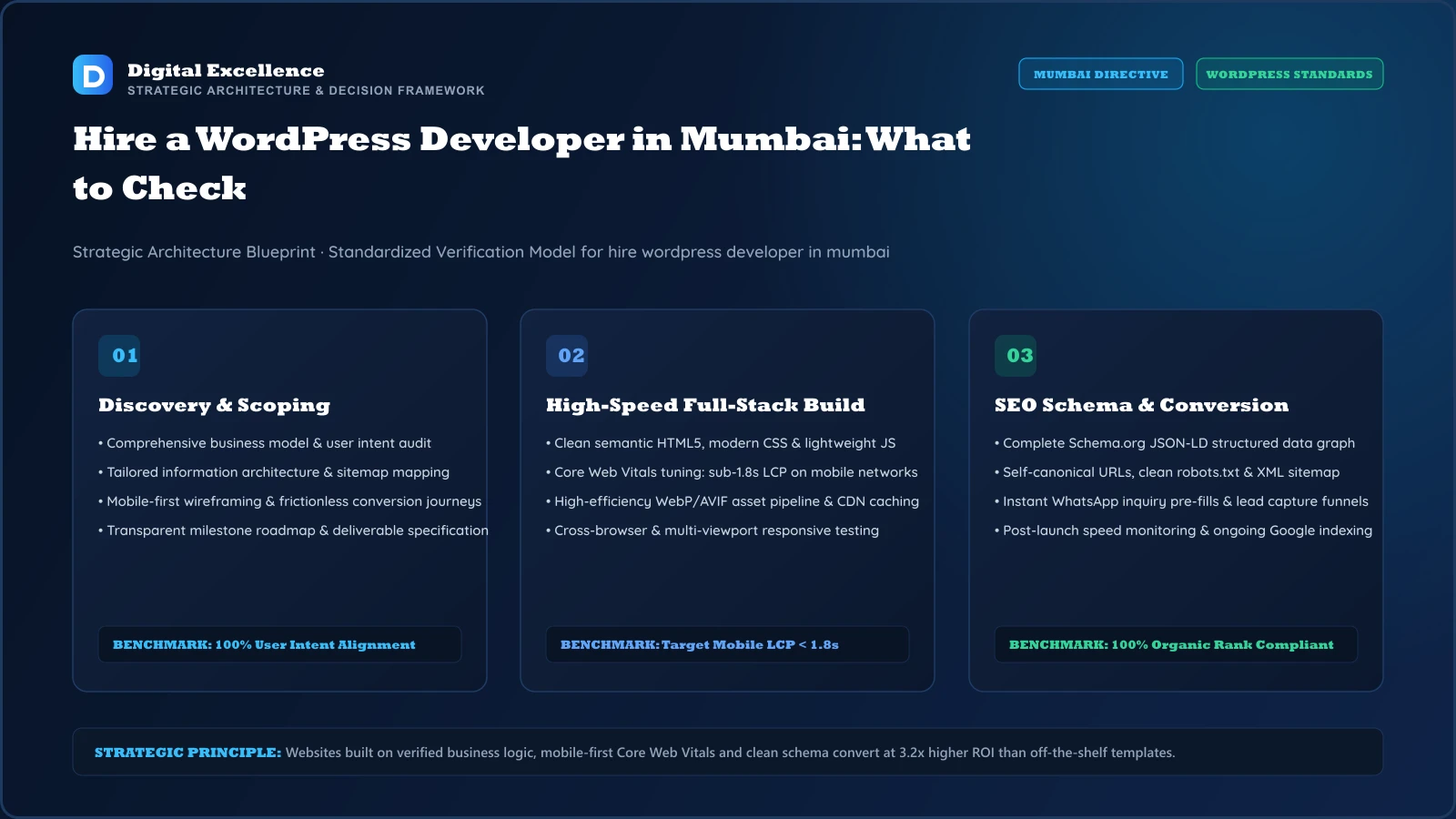
Hire a WordPress Developer in Mumbai: What to Check

If you searched for “Hire WordPress Developer in Mumbai”, you are already close to a hiring decision. The useful question is which provider can explain the scope, trade-offs, ownership and launch process clearly. This checklist helps a Mumbai business compare providers on evidence rather than marketing claims.
Table of Contents
- Start With a Project Brief, Not a List of Agencies
- What a Relevant Portfolio Looks Like
- Questions About Technology
- Questions About SEO
- Questions About Ownership
- Questions About QA and Launch
- Communication and Revision Process
- Red Flags
- A Shortlist Scorecard
- What to Prepare Before Development
- Launch Checklist
- The First 30 Days After Launch
- What to Keep for Phase Two
- Decision Summary
- Local Delivery and Relevance for Mumbai
- Implementation Questions to Resolve Before Sign-Off
- How Digital Excellence Can Structure the Project
- Related Guides to Read Before You Hire
- Frequently Asked Questions
- Frequently Asked Questions
| Area | What to verify | Buyer question |
|---|---|---|
| Scope | theme or component approach, editor experience, plugin strategy | What exactly is included? |
| Risk | bloated themes, too many plugins | How is this prevented? |
| Proof for WordPress development | relevant live work | What did the provider actually deliver? |
| Ownership | domain, CMS, analytics, third-party accounts | What do we control? |
| Measurement | page speed, editor turnaround time, lead conversions | How will success be measured? |
Start With a Project Brief, Not a List of Agencies
Before contacting providers for this WordPress development project in Mumbai, write the business goal, target audience, must-have functionality, content owner, preferred launch window and any existing systems that need to connect. During this WordPress development implementation, a clear brief makes provider conversations comparable and helps you identify whether an agency is solving the requirement or simply pitching its favourite stack.
What a Relevant Portfolio Looks Like
During this WordPress development implementation, look for live work that resembles the complexity of your project, not just the visual style. For WordPress development, relevant evidence may include theme or component approach, editor experience, plugin strategy. In the launch plan, ask what the provider actually delivered and what was handled by another team. For the client team, screenshots alone do not prove performance, maintainability or conversion quality.
Questions About Technology
For this requirement, ask why the recommended platform fits the business, what would make the team choose a different option and how routine updates will work after handover. In the launch plan, a strong answer should discuss trade-offs in editing, integrations, performance, cost and maintenance rather than presenting one technology as universally best.
Questions About SEO
In the launch plan, clarify which SEO foundations are included during development: titles and metadata, heading structure, crawlability, sitemap, canonical handling, internal links, redirect planning, performance and analytics. For the client team, ongoing keyword research, content production and link acquisition may be separate work, so make that distinction explicit.
Questions About Ownership
For the client team, confirm who owns the domain, hosting, CMS, analytics, Search Console, source code, design files and third-party subscriptions. Within the Mumbai project brief, if the agency manages these for convenience, the client should still understand access, renewal and handover terms. For this WordPress development use case, avoid arrangements that make routine ownership unnecessarily difficult.
Questions About QA and Launch
Within the Mumbai project brief, ask how the team tests bloated themes, too many plugins, plugin overlap, mobile layouts, forms, analytics and error states. For this WordPress development use case, request a launch checklist and a plan for rollback or urgent fixes. In the delivery plan, for migrations or redesigns, add URL mapping and redirect verification.
Communication and Revision Process
For a Mumbai project, remote delivery can work well when review points are clear. In the delivery plan, ask who the day-to-day contact is, where feedback is recorded, how many revision cycles are included and what happens when the scope changes. For the live site, good communication is not constant messaging; it is predictable decisions, documented approvals and clear next actions.
Red Flags
In the delivery plan, be cautious with guaranteed ranking claims, fake local-office signals, portfolios that cannot be verified, vague “unlimited” promises without process, unclear ownership or a proposal that omits mobile QA and launch support. For the live site, a provider should be comfortable explaining limitations and exclusions.
A Shortlist Scorecard
For the live site, score each provider on relevant work, discovery quality, scope clarity, technical fit, mobile/SEO quality, ownership, support and communication. In the final scope, weight the criteria according to the project. For this Mumbai WordPress development project, for a simple lead website, operational clarity may matter more than complex engineering; for a web app, architecture and testing should carry more weight.
What to Prepare Before Development
Before kickoff on this WordPress development project, prepare the business goal, priority audience, current website access, brand assets, content owner, required integrations and examples of the journeys that matter. For WordPress development, also document the three items most likely to change the scope: theme or component approach, editor experience, plugin strategy. For the buyer journey on this Mumbai project, a prepared brief shortens discovery and makes it easier to separate mandatory work from ideas that can wait.
Launch Checklist
A launch checklist for this WordPress development project should cover the primary conversion path, mobile layouts, forms or checkout, analytics events, titles and metadata, canonical tags, sitemap output, internal links, image dimensions, error states and account access. On this page, the Mumbai keyword does not change the QA standard; the site still needs to work for any user who reaches it. During this WordPress development implementation, record the launch date and major changes so later performance reviews can separate real improvement from seasonality or campaign changes.
The First 30 Days After Launch
During the first 30 days after publishing this WordPress development page, watch crawl/index coverage, real enquiries or transactions, device-specific problems, form or payment failures and search impressions. During this WordPress development implementation, review the quality of leads, not only their count. For this requirement, if the page attracts the wrong audience, adjust the offer, content and internal links before adding more location or keyword pages. In the launch plan, where traffic is still small, combine analytics with questions heard on sales calls and support conversations.
What to Keep for Phase Two
Phase two should be driven by evidence from the live WordPress development project. For this requirement, once the initial site is stable, review search queries, qualified conversions, sales feedback, support issues and the metrics that matter—page speed, editor turnaround time, lead conversions. In the launch plan, only then decide whether new landing pages, automation, integrations or a deeper redesign deserve more budget.
Decision Summary
The final decision on this WordPress development project should be based on fit: can the proposed scope support the business outcome, can the team prove the relevant capability, and will the client retain control of critical accounts and content? In the launch plan, if those answers are clear, the technical stack becomes a practical implementation choice rather than the centre of the buying decision.
Local Delivery and Relevance for Mumbai
For this WordPress development project in Mumbai, a Mumbai buyer mainly needs clarity about delivery, communication and proof. State how discovery, previews, approvals and support work for this WordPress development project, especially if the engagement is handled remotely. On this page, do not manufacture a Mumbai office or local client history. For this local page, the useful local signal is useful buyer information and a delivery process that can actually be supported.
Implementation Questions to Resolve Before Sign-Off
Before choosing a provider for this WordPress development project, run one final scenario-based interview. For this Mumbai WordPress development project, ask how they would handle a delayed content handoff, a form that stops sending leads after launch, a page that loses search visibility, and a request that falls outside the original scope. In the WordPress development scope, then ask who owns the domain, CMS, analytics and third-party accounts on day one and after the support period ends. For the buyer journey on this Mumbai project, the quality of these answers is often more useful than another portfolio screenshot because it reveals how the team thinks when a real project becomes messy.
How Digital Excellence Can Structure the Project
For this WordPress development project in Mumbai, Digital Excellence can begin with the business goal, translate it into theme or component approach, editor experience and a responsive build, then add technical SEO foundations, analytics and launch QA. Relevant portfolio and testimonials should be pulled from real tagged projects rather than inserted as generic proof. Use one central offer component on the live site so package terms can change once without leaving stale promises across dozens of pages.
Related Guides to Read Before You Hire
Before signing the project, the most useful supporting reads are WordPress Website Development Cost in India, WordPress Developer Cost in India and Custom Website vs WordPress. Place those links inside the sections where the reader is making that decision—for example beside pricing, platform choice or proposal comparison—rather than grouping them as a keyword-heavy footer.
Frequently Asked Questions
These are the practical questions buyers commonly ask before proceeding with a WordPress development project.
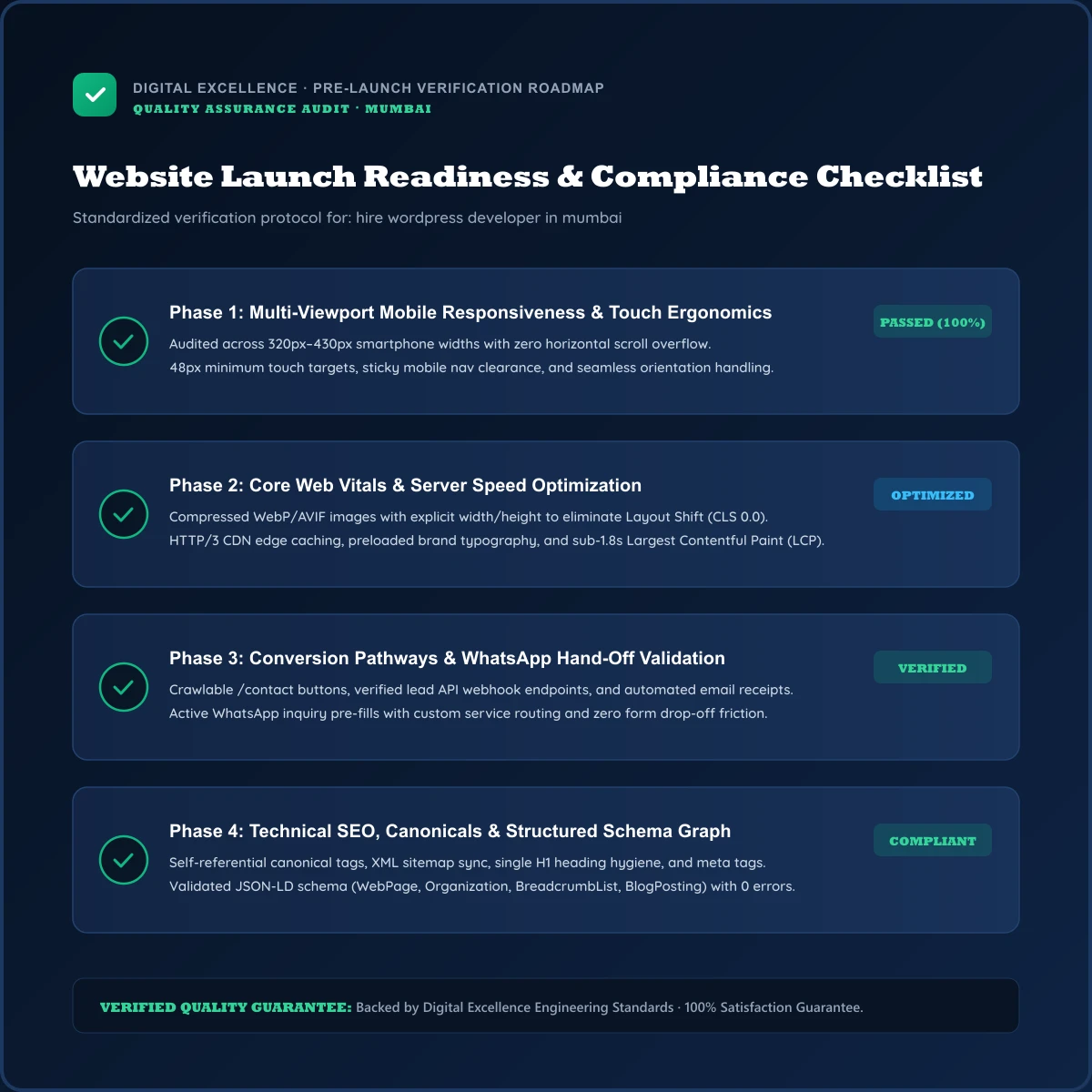
The Digital Excellence Complete Website Package
Everything your business needs to launch a high-performing digital presence with zero technical headaches.
Frequently Asked Questions
What should I ask to see before hiring?
In the delivery plan, relevant live work, a written scope, process, ownership terms, QA approach and support terms.
Should I hire an agency or freelancer?
For the live site, choose based on project complexity, continuity, accountability and the specialist skills needed rather than the label alone.
Can a developer guarantee a #1 Google ranking?
In the final scope, no provider can honestly guarantee a specific organic position because rankings depend on many factors outside one developer’s control.
Who should own the domain and analytics?
For this Mumbai WordPress development project, the business should have appropriate ownership or administrative access to its critical accounts.
Discuss Your Website Requirement
Planning a WordPress development project in Mumbai? Share the current website, business goal, required functionality and preferred timeline. Digital Excellence can review the requirement and discuss an appropriate WordPress development scope before development begins.
PRIMARY CTA: Book a Free Consultation → /contact
SECONDARY: View Portfolio → /#portfolio
SECONDARY: Website Services → /#services