Website Development Timeline by Project Type: 7 Days to 6 Months
Digital Excellence already has a guide answering “How long does website development take?” This companion article targets the narrower search intent around a website development timeline: what happens week by week, which phases can overlap and what causes a schedule to expand. The objective is to help buyers plan internal approvals, content and integrations before a launch date is promised.
Table of Contents
- Why This Decision Is More Important Than It Looks
- Milestone 1: Discovery and Scope
- Milestone 2: Content and Design
- Mobile Quality Checklist
- SEO and Information Architecture
- Performance and Technical QA
- Ownership and Access
- Recurring Costs and Dependencies
- How to Compare Options
- Common Red Flags
- Pre-Decision Checklist
- What to Measure After Launch
- First 90 Days After Launch
- Final Takeaway
- Timeline Estimates Should State Their Assumptions
- Content Can Run in Parallel—But Only With a Stable Structure
- Approval Time Is Part of the Project Timeline
- Third-Party Dependencies Can Be the Longest Lead-Time Item
- QA Should Have Protected Time
- Use Phase Two to Protect a Fixed Launch Date
- Migration Projects Need a Cutover Plan
- Post-Launch Time Is Part of the Timeline
- Final Timeline Rule
- Estimate by Templates and Workflows, Not Pages Alone
- Design System Decisions Can Accelerate Later Pages
- Parallel Work Has Coordination Cost
- Data and Content Imports Need Validation Time
- Client-Side Delays Should Be Visible in Status Updates
- Schedule the Launch Window, Not Just the Launch Date
- Use a Post-Launch Backlog
- Fast Feedback Needs a Decision SLA Too
- Content Freeze Can Protect Complex Launches
- Performance Optimisation Should Not Be Left to the Final Day
- SEO Migration Monitoring Continues After Launch
- Timeline Buffers Should Be Intentional
- Use Milestone Forecasting Instead of One Final Deadline
- Separate ‘Build Complete’ From ‘Launch Ready’
- Final Timeline Principle
- Add a Dependency Register to the Timeline
- Final Buyer Check
- Final Timeline Standard
- Frequently Asked Questions
Timeline by Project Type
| Project | Broad timeline | Main dependency |
|---|---|---|
| Landing page | 2–10 days | copy/design readiness |
| Small business site | 2–6 weeks | pages, feedback, content |
| Corporate site | 4–12 weeks | stakeholders, migration |
| Ecommerce | 4–12+ weeks | catalogue, payments, shipping |
| Custom app | 2–6+ months | workflows, backend, integrations |
Why This Decision Is More Important Than It Looks
A timeline is a chain of dependencies. Design cannot be final if the content model keeps changing. Ecommerce cannot launch if product data or payment accounts are not ready. A fixed date becomes realistic only when both provider and client responsibilities are visible.
Milestone 1: Discovery and Scope
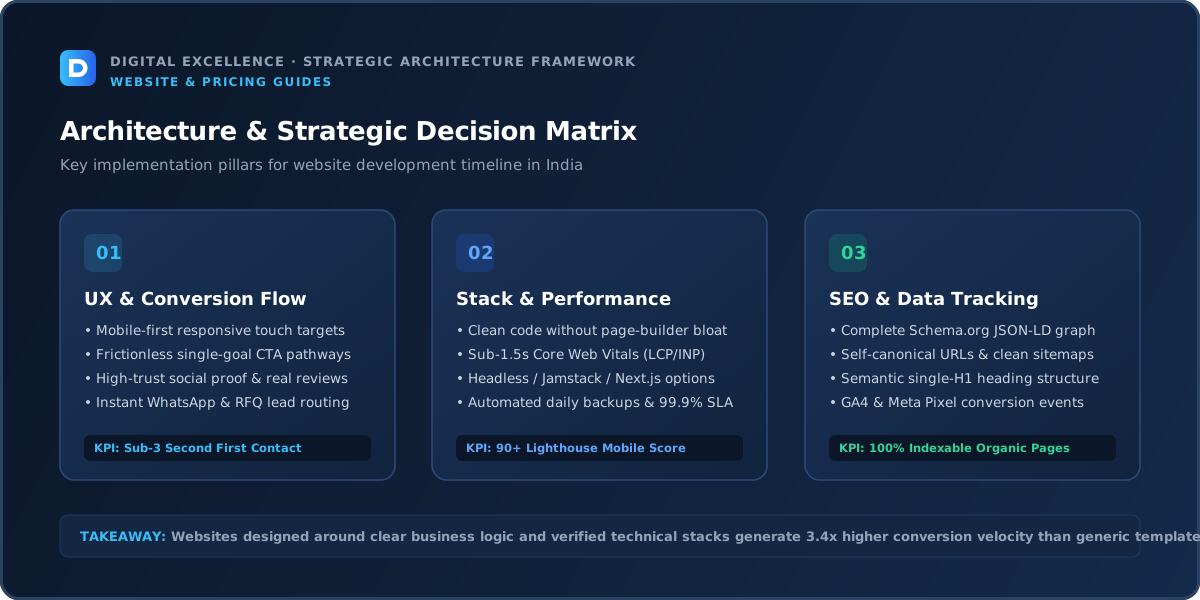
Clarify goals, audience, pages, workflows, platform, integrations, content and success measures. Small sites can do this quickly; custom apps may require user stories and technical planning.
The output should be a scope both sides understand, not a discovery deck that never affects the build.
Milestone 2: Content and Design
Collect real content early so layouts reflect actual heading and paragraph lengths. Approve the design system and representative templates before designing every page independently.
For fast projects, copy, design and development can overlap, but ownership and review deadlines must be clear.
Mobile Quality Checklist
A practical check for “Website Development Timeline by Project Type: 7 Days to 6 Months” is whether mobile quality checklist changes cost, risk, timeline or handover. If it does, make that assumption explicit before approving the project.
Review the project on real mobile widths, not only a desktop browser. Check navigation, heading size, forms, tables, images, sticky elements and the primary conversion path. The site should remain readable without forcing the user to zoom or dismiss intrusive overlays.
For long-form SEO pages, typography matters too. A developer who can make a 2,000-word buying guide comfortable on a phone is solving a different problem from someone who only creates impressive hero sections.
SEO and Information Architecture
A practical check for “Website Development Timeline by Project Type: 7 Days to 6 Months” is whether seo and information architecture changes cost, risk, timeline or handover. If it does, make that assumption explicit before approving the project.
Important pages should have a clear purpose, descriptive URLs, one H1, unique titles and meta descriptions, self-canonicals, sitemap coverage and contextual internal links. Google recommends crawlable links with meaningful anchor text so users and search engines can discover related pages.
If an existing site is being changed, redirects and migration planning must be part of the scope. Technical SEO should be visible in the implementation checklist rather than implied by the word “SEO-friendly.”
Performance and Technical QA
A practical check for “Website Development Timeline by Project Type: 7 Days to 6 Months” is whether performance and technical qa changes cost, risk, timeline or handover. If it does, make that assumption explicit before approving the project.
Before launch, test the primary templates for loading, interaction and visual stability. Google recommends good Core Web Vitals as part of an overall good page experience. Performance work should focus on real bottlenecks such as media, fonts, scripts, plugins or apps.
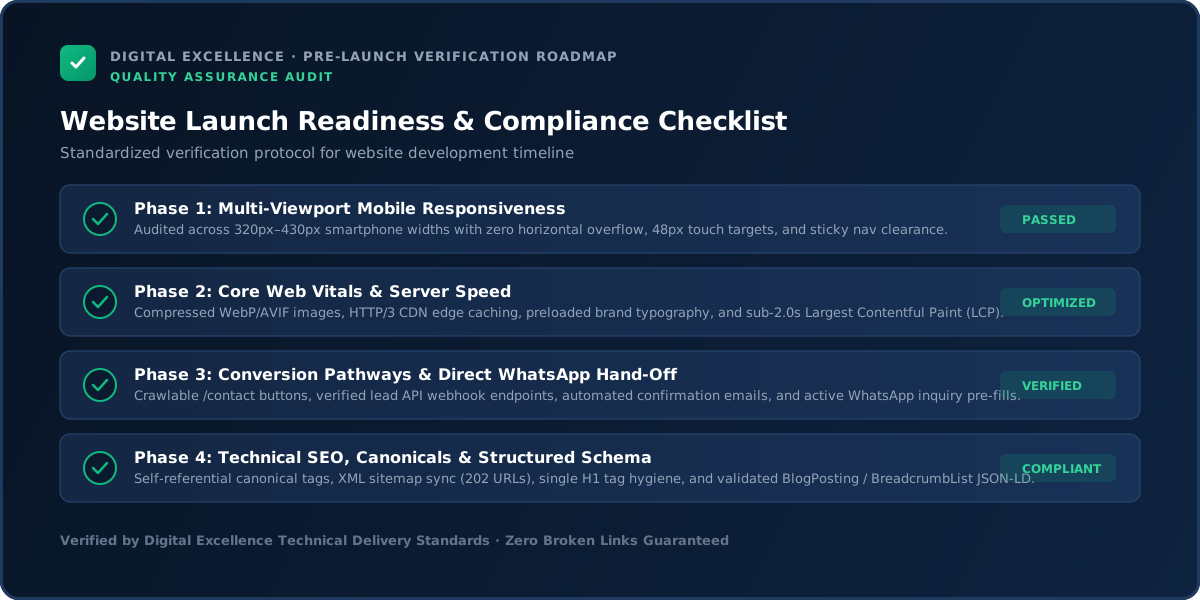
QA should also include forms, validation, error states, analytics events, links and the critical user journeys. A fast page with a broken contact form is not a successful launch.
Ownership and Access
The timeline should include account access: domain, hosting, CMS, analytics, payment gateways and APIs. Waiting for credentials can delay a project as much as coding.
Recurring Costs and Dependencies
Delays can increase cost when they require rescheduling a team, rework after late content, or new features added during development. The contract should explain how pauses and scope changes affect the schedule.
How to Compare Options
When vendors quote different timelines, compare assumptions. One may assume copy is final and use a theme; another may include research and custom UI. Speed has meaning only relative to scope.
For a related buying decision, see Website Development Proposal Checklist: What Should Be Included?.
Common Red Flags
Red flags include guaranteed aggressive deadlines before requirements are known, no QA period, no client-dependency list and scheduling launch immediately after development with no contingency.
Pre-Decision Checklist
A practical check for “Website Development Timeline by Project Type: 7 Days to 6 Months” is whether pre-decision checklist changes cost, risk, timeline or handover. If it does, make that assumption explicit before approving the project.
Write down the project goal, required pages or workflows, platform, content owner, integrations, SEO scope, analytics, migration needs, mobile requirements, revisions, timeline, payment milestones, account ownership, handover and support.
Mark anything not specified as unknown. Unknowns are where budget surprises and disputes usually appear.
What to Measure After Launch
Track milestone completion, unresolved dependencies and approval turnaround during the project. After launch, track the business events the site was built to support rather than treating “on-time” as the only success metric.
First 90 Days After Launch
A practical check for “Website Development Timeline by Project Type: 7 Days to 6 Months” is whether first 90 days after launch changes cost, risk, timeline or handover. If it does, make that assumption explicit before approving the project.
Monitor technical errors, analytics, Search Console, form or ecommerce events and real user feedback. Fix high-impact issues before adding decorative features.
Use actual queries and conversion data to improve content and internal links. The first version should be a strong foundation for iteration, not a frozen asset that cannot change.
Final Takeaway
A website timeline is a coordination plan, not just a development estimate. Make dependencies and decision deadlines visible before committing to the launch date.
The page should help a buyer make a better decision even if they never become a client. That is the standard for durable SEO content: useful detail, honest limitations, clean structure, contextual links and an excellent mobile reading experience.
Timeline Estimates Should State Their Assumptions
A four-week estimate may assume final copy on day one, one decision-maker, no custom integration and feedback within 24 hours. If those assumptions are hidden, the date looks more certain than it really is.
Ask the provider to list schedule assumptions beside the estimate. This turns delays into identifiable dependencies rather than arguments.
Content Can Run in Parallel—But Only With a Stable Structure
Copywriting and design can overlap when the sitemap and message hierarchy are clear. If the service offering itself is still changing, designing around unfinished content can create rework.
Use representative real copy early, particularly for hero sections, service pages and mobile layouts.
Approval Time Is Part of the Project Timeline
If three stakeholders each need several days to review every stage, the project cannot move at the same speed as a founder-led site with one approver. Build review windows into the schedule.
Consolidate feedback before sending it to the design/development team so contradictory requests do not create extra cycles.
Third-Party Dependencies Can Be the Longest Lead-Time Item
Payment gateways, app approvals, API access, domain transfers, compliance reviews, photography and product data can take longer than code. Identify these dependencies during kickoff and start them early.
The developer should not discover a week before launch that an external account still needs verification.
QA Should Have Protected Time
Do not plan the schedule so development ends on the same day as launch. Reserve time to test forms, mobile states, integrations, metadata, redirects, analytics and actual production configuration.
When the deadline becomes tight, reduce scope instead of deleting QA.
For a useful scope comparison, read How to Compare Website Development Quotes: 2026 Buyer Checklist.
Use Phase Two to Protect a Fixed Launch Date
If a campaign or event date cannot move, define which features are essential for launch and which can follow afterward. A clear phase-two list is better than rushing every idea into production.
This also creates a natural backlog for improvements based on real user feedback.
Migration Projects Need a Cutover Plan
Decide when content freezes, when data is exported, how DNS changes, who validates the new site and what the rollback plan is. Ecommerce or frequently updated sites may need special handling to avoid losing orders or recent content.
Schedule the cutover when the right team members are available to monitor it.
Post-Launch Time Is Part of the Timeline
Plan a short period for monitoring forms, analytics, Search Console, payment/order flows and production-only issues. Launch is a transition, not the instant the team stops thinking about the project.
Final Timeline Rule
A reliable schedule is a shared dependency map. The fastest project is not the one with the most aggressive promise; it is the one with the clearest scope, prepared inputs, fast decisions and protected QA.
Estimate by Templates and Workflows, Not Pages Alone
A 50-page content site using four templates can be faster than an eight-page site with eight unique interactive designs. For ecommerce or apps, workflows matter even more than page count.
Use unique templates, integrations and data complexity to explain the timeline.
Design System Decisions Can Accelerate Later Pages
Approve typography, spacing, buttons, forms, cards and common sections early. Once the component system is stable, subsequent pages can be designed and developed faster with more consistency.
This is one reason the first few pages may take longer than later ones.
Parallel Work Has Coordination Cost
Design, content and development can overlap, but parallel work increases communication needs. If copy changes after components are built, or designs change after development starts, speed gains can disappear into rework.
Parallelise stable work, not unresolved decisions.
Data and Content Imports Need Validation Time
Large catalogues, blog archives, member records or property listings require import tests and cleanup. Do not schedule migration as an instant final task.
Run sample imports early so data problems are discovered before launch week.
Client-Side Delays Should Be Visible in Status Updates
Track outstanding approvals, content and credentials alongside development tasks. This avoids a misleading status where the developer appears behind schedule while the critical path is actually waiting on client input.
Shared visibility helps teams make faster decisions.
For the next planning step, use Startup Website Cost in India: 2026 Guide.
Schedule the Launch Window, Not Just the Launch Date
Choose a time when developers, stakeholders and support people can monitor the site after deployment. Avoid launching immediately before a weekend or major campaign if nobody can respond to issues.
The safest launch is one with people available to verify it.
Use a Post-Launch Backlog
Not every nice-to-have needs to delay launch. Keep a documented list of improvements discovered during QA or early use and prioritise them based on real impact.
This protects the date without pretending the website will never evolve.
Fast Feedback Needs a Decision SLA Too
If the developer commits to a delivery timeline, the client can commit to review windows. For example, design feedback within two business days keeps the critical path visible.
This is especially useful when a fixed marketing launch depends on the website.
Content Freeze Can Protect Complex Launches
For large migrations, define a short period when non-essential edits stop so final data and redirects remain stable. If the business cannot freeze updates, plan an incremental or delta migration process.
The method should match how frequently the old site changes.
Performance Optimisation Should Not Be Left to the Final Day
Image strategy, font loading and script choices are architectural decisions. Building them into development is more predictable than trying to rescue performance after every feature is complete.
Reserve final testing for verification, not for discovering the entire page is too heavy.
SEO Migration Monitoring Continues After Launch
Check indexability, sitemap, redirects, canonical URLs and important organic landing pages after production goes live. Search engines need time to process changes, so monitor trends rather than expecting instant stability.
Escalate technical errors quickly and avoid making multiple unrelated SEO changes immediately after migration.
Timeline Buffers Should Be Intentional
Add contingency for external approvals, production configuration and unexpected bugs rather than hiding a buffer inside every task. A visible launch buffer helps stakeholders understand why the schedule is realistic.
When everything goes smoothly, the team gains time for polish instead of inventing last-minute features.
Use Milestone Forecasting Instead of One Final Deadline
Track the expected date for discovery, design approval, development-ready, content-ready, QA and launch. If one milestone slips, the team can see the downstream impact early.
A single launch date hides problems until there is very little room to respond.
Separate ‘Build Complete’ From ‘Launch Ready’
Development can be complete while content, legal review, analytics or integration approvals remain unfinished. Use different statuses so stakeholders understand what is blocking production.
This is especially useful for corporate, ecommerce and regulated projects.
Final Timeline Principle
The most reliable website timeline is built from dependencies and decisions, not optimism. Prepared content, one accountable approver and a protected QA window can shorten projects more effectively than simply asking developers to work faster.
Add a Dependency Register to the Timeline
Maintain a short list of items that can block launch—content, approvals, APIs, gateway verification, domain access, data migration and external vendors—with an owner and due date. Review it during project updates.
This keeps the team focused on the true critical path rather than only the visible design and development tasks.
Final Buyer Check
A realistic timeline names the dependencies and gives QA protected space. If the schedule works only when nothing goes wrong, it is not a robust plan.
Final Timeline Standard
Protect scope, decisions and QA.
For implementation options, explore website development services and Digital Excellence portfolio.
Frequently Asked Questions
Can a professional website be built in seven days?
Some focused sites can when scope and content are ready. Complex ecommerce and custom systems usually need more time.
What delays websites most?
Missing content, slow feedback, scope changes and third-party dependencies are common causes.
Can design and development overlap?
Yes, particularly with a stable design system, but uncontrolled overlap can create rework.
How much time should QA get?
Enough to test the actual scope; there is no universal number. Do not remove QA simply to protect a date.
Should I set a fixed launch date?
Yes when the business needs one, but define what features can move to phase two if dependencies slip.
What happens after launch?
Plan a monitoring and support period for forms, analytics, indexing and production-only issues.
Need a Website Built on a Clear Timeline?
Need a website scope or quote based on your real requirements rather than a generic package? Digital Excellence can review the pages, platform, integrations, SEO needs and launch priorities.